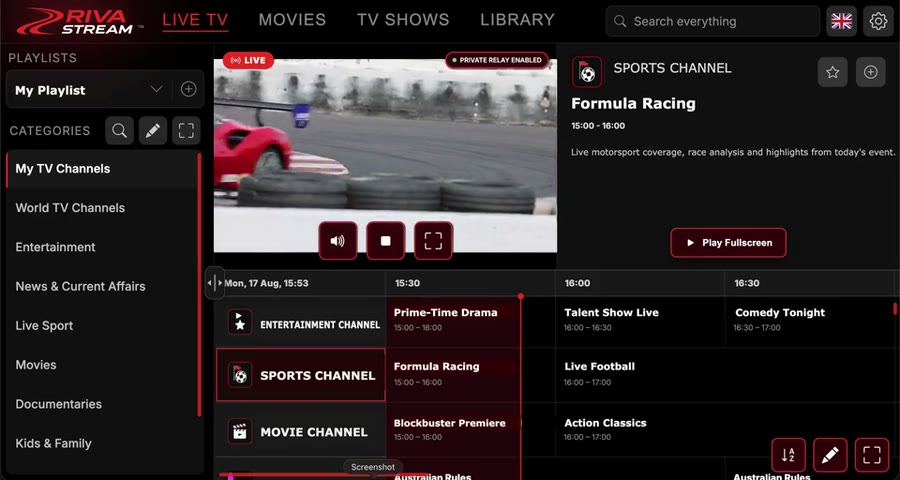
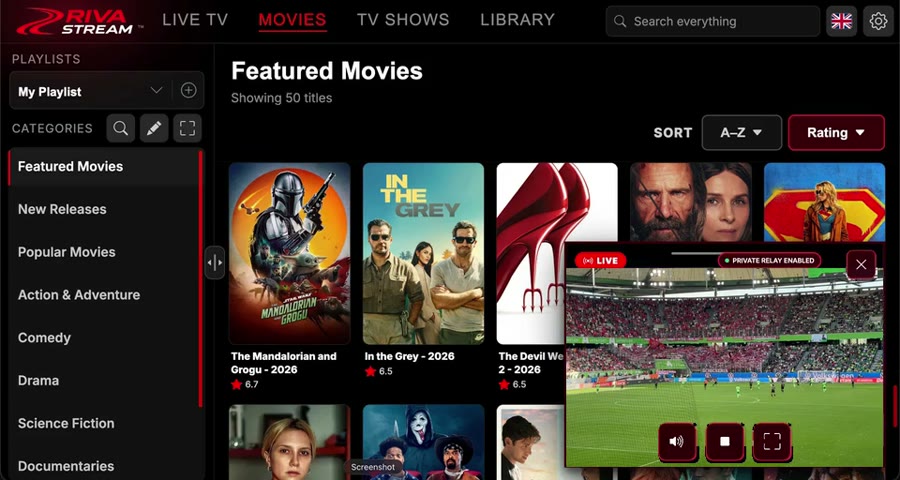
Your TV, everywhere. Built for your car's touchscreen.
Stream live IPTV, movies and shows in your car and in your web browser.
Get started in seconds
1
Add your playlists
Add your IPTV service and/or a media manifest URL.
2
Connect
We'll pull your channels, EPG data and streams automatically.
3
Watch
Browse, search, and stream - right from your car's browser.
What is Riva Stream?
Riva Stream is a live TV platform for in-car and desktop browsers. Riva Free is our curated playlist of live channels from official broadcaster and FAST (free ad-supported) sources — see channel sources & rights. You can also connect your own playlists. Premium unlocks enhanced player features.
Premium is a digital software subscription only. Refunds and cancellations are described in our Refund Policy. By using this site you agree to our Terms of Service and Privacy Policy.
™
Categories
LIVE
🎵 Audio
Subtitles
LIVE
Categories
™
Your TV, everywhere. Built for your car's touchscreen.
Stream live IPTV, movies and shows in your car and in your web browser.
Access to stream conversion servers for car browser playback
Full EPG access
External add-on support
Create your content collection with full library access
Category organisation
Remove adverts
Secure Stripe Checkout
Scan to pay with phone
Open your phone camera and scan this secure code to complete payment in Stripe on your phone.
Preparing secure payment link…
Loading checkout…
☌
Movie source
Categories
Custom Channels
Movies
Select a category to browse your IPTV movie library.
Sort
Continue Watching
Actor
Known For
Not started
Browser Compatibility
Tesla browser movie playback essentials
This list is trimmed down to the formats you actually care about for Tesla movie playback: MP4 video and a simple audio sanity check, both with direct files that can start in the browser immediately.
If MP4 with H.264 video and AAC-style browser-safe audio works here, that is the strongest sign your movie files are in the right shape for Tesla browser playback.
We use essential cookies to run this site and, only with your consent, analytics and advertising cookies. See our Privacy Policy. You can change your choice at any time by clearing your browser data.
Please wait
Sign in to continue
At least 8 characters
One uppercase letter
One lowercase letter
One number
OR
Scan with your phone to sign in without typing.
Scan with your phone to create your account.
Need an account?
Already a member?
Verify your email to continue
We sent a verification link to your email Click the link in the email to activate your account. Check your spam or junk folder if you don’t see it.
Email verified
Your email has been verified. Press OK to continue to your account.
Premium required
This channel needs to be transcoded to play. Upgrade to Premium for reliable playback on every channel.
Get Premium
Upgrade to Premium to view the full programme guide for every channel and unlock the rest of the guide.
Get Started
Step 1 of 3
Welcome to Riva
Let’s connect your first playlist and make sure playback works well in your browser.
Results for ""
Channels
Movies
TV Shows
Categories
Settings
Tip: Tap the button next to a field to scan a QR code with your phone and send text directly to your car.
Playlists
Tip: Tap the button next to a field to scan a QR code with your phone and send text directly to your car.
Paste your media manifest URL. The source type is detected automatically.
Sign in to sync your settings, playlists and favourites across devices.
Cancel subscription
Test mode
Loading Stripe billing…
Add Playlist
™
Supports M3U and provider playlists
Adding Playlist
Connecting to provider…
Edit Categories
Search Categories
Phone Cast
Use your phone as a lightweight sender. This web-first beta sends direct video URLs from your phone browser into the Tesla browser.
Receive Phone Cast
Open Riva Stream on your iPhone, choose Send From Phone, then enter this code.
Cast Code
......
Starting cast session…
Direct link: open this on your phone to prefill the cast code automatically. Local iPhone files are not relayed in this web-first beta yet; use direct video URLs for now.
Send To Tesla
Enter the cast code shown in the Tesla browser, then paste a direct browser-playable video URL.
Keep this screen awake and leave Safari open while uploading. Locking the iPhone or switching apps may interrupt the upload.
If you choose a local file, Riva will upload it in chunks and start the Tesla playback as soon as the first chunk is ready. If no file is selected, Riva will send the direct video URL instead.
Need help?
Our support team is here for you. Email us and we'll get back to you as soon as possible.
support@rivastream.com
Add Stream URL
Enter your media manifest URL to enable movie browsing and playback in the Movies tab.
Recommended manifest filters for browser-friendly playback:
Choose an option
Subtitles
Delete Playlist
Send from your phone
Scan this QR code with your phone's camera, fill in the form then tap Send to Car.
Waiting for your phone…
Audio compatibility
Recommended manifest filters for browser-friendly playback:
Change email
Current email
New email
Current password
We'll send a verification link to your new address before the change takes effect.
Change password
Current password
New password
Confirm new password
Choose a strong password you don’t use anywhere else. You’ll stay signed in on this device.
Create Channel
Add to Custom Channel
Enjoying Riva Stream?
Your trial ends in 2 days.
Your free trial has ended
Add a payment method to keep watching live TV, movies and shows on Riva Stream. You can cancel anytime in Settings → Cancel Premium Membership.
Get Premium now to keep watching your saved playlists.